This documents the v1 product. It is kept for integrations already running
on it. If you are building something new, start with the
Quickstart.
Overview
Abandon cart recovery is one of the most effective uses of Voice Agents in e-commerce. Automated calls and messages remind customers of the carts they left and help them finish the purchase. This guide covers the full setup, using a GoKwik webhook and Shopify coupon automation.Automated & Instant
GoKwik webhooks report abandoned carts as they happen, and a personalized
AI voice call goes out within minutes.
Smart Incentives
Generate unique, time-limited Shopify discount coupons automatically to
encourage customers to complete the purchase.
Multi-Channel Outreach
Combine an AI voice call with an immediate WhatsApp follow-up containing the
checkout link and coupon code.
How It Works
Recovery runs automatically and starts in real time:- Cart Abandoned: A customer abandons their cart on your GoKwik checkout page.
- Webhook Trigger: GoKwik instantly sends a webhook notification to the Voice Agents platform with the cart and customer details.
- Coupon Generated: The system connects to your Shopify store and automatically generates a unique, time-limited discount coupon.
- AI Voice Call: Within minutes, an AI Voice Agent places a personalized call to the customer, referencing their cart items and offering the discount.
- WhatsApp Follow-up: Right after the call, the customer gets a WhatsApp message with the direct GoKwik checkout link and their unique coupon code, so they can complete the purchase from there.
Data Access & Permissions
Voice Agents accesses only the minimum data it needs to run.Strictly Read-Only and Action-SpecificVoice Agents never changes cart contents, payment information or customer data in GoKwik or Shopify. It only listens for events and performs specific actions that you have authorized.
-
GoKwik Integration:
- Access: Listens to the Abandon Cart webhook to receive customer contact info, cart contents, and the cart recovery link.
- Permissions: Read-only.
-
Shopify Integration:
- Access: Reads product information (like titles) using the product ID provided by GoKwik.
- Permissions: Primarily requires permission to create and manage discount codes.
-
WhatsApp Integration:
- Access: No access to your WhatsApp data.
- Permissions: Requires permission to send messages using your pre-approved templates.
Setup Guide
Step 1: GoKwik Webhook Integration
This is the recommended method for real-time recovery.-
Contact the GoKwik Integration Team.
- Email:
integration@gokwik.co - Subject:
Voice Agents Abandon Cart Webhook Setup - Body: “Hello, please add the abandon cart webhook integration for our account to send notifications to the Voice Agents platform. Our webhook endpoint is:
[Your Webhook URL]”
- Email:
-
Get Your Webhook Endpoint.
- This unique URL is on your abandon cart campaign page in the Voice Agents platform.
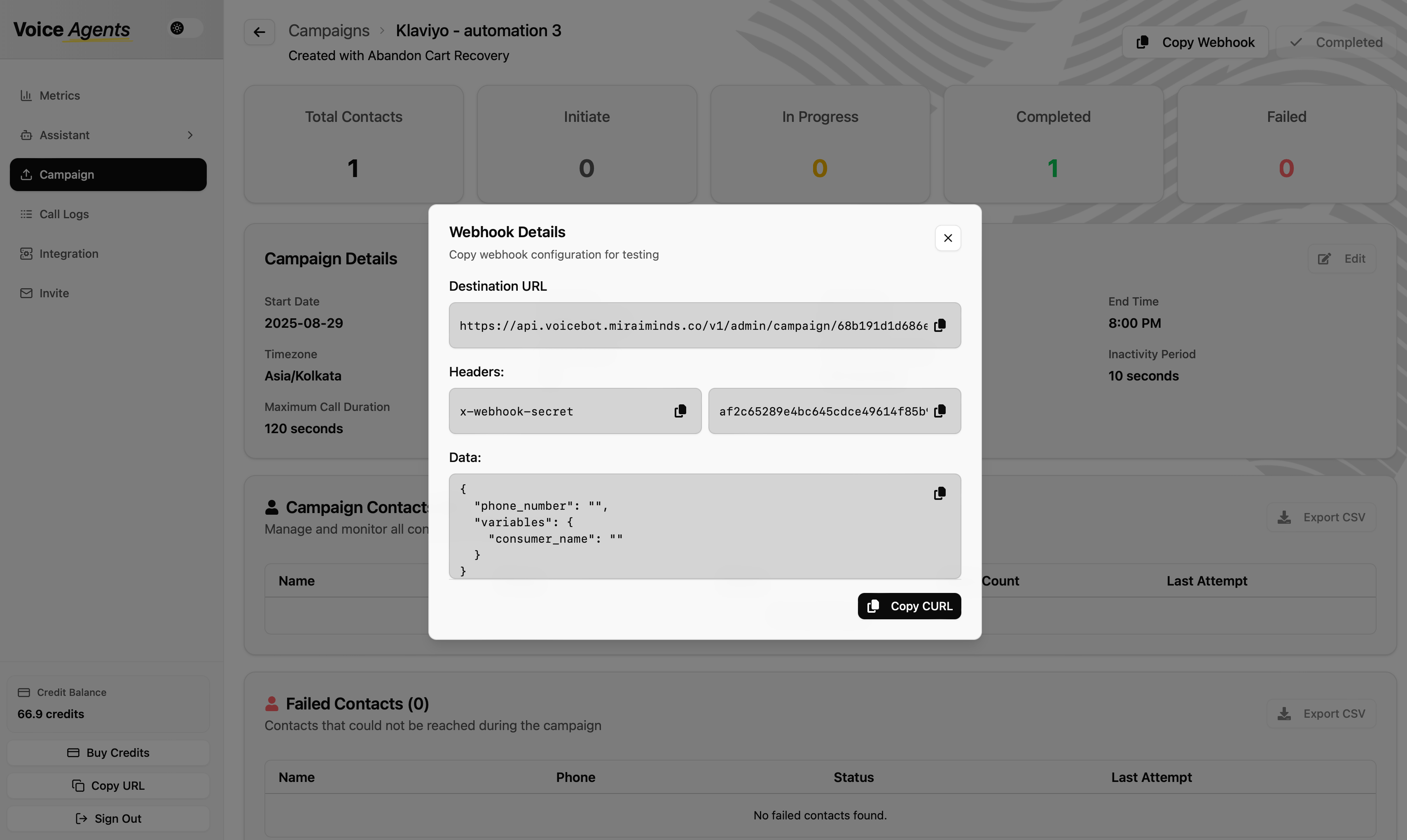
- This unique URL is on your abandon cart campaign page in the Voice Agents platform.
-
How It Works:
- Once this is set up, GoKwik sends a JSON payload with the cart details to this endpoint whenever a cart is abandoned. The platform pulls out the customer name, phone and cart items and uses them to start the recovery call.
GoKwik Webhook Data Structure
Step 2: Shopify Integration Setup
You need this to generate discount codes automatically. For detailed setup instructions, see the complete Shopify integration guide.- Connect Your Store: In the Voice Agents dashboard, navigate to Integrations and select Shopify.
- Authorize: Enter your Shopify store URL (
your-store.myshopify.com) and follow the prompts to authorize the connection. - Configure Coupon Settings:
- Discount Percentage: Set a default value (e.g., 10%).
- Coupon Validity: Set an expiration time (e.g., 1 hour) to create urgency.
- Usage Limits: Configure as single-use per customer.
Step 3: WhatsApp Integration Setup
You need this to send the follow-up message with the checkout link.- Connect Your Account: In the Voice Agents dashboard, navigate to Integrations and select WhatsApp.
- Authorize: Follow the steps to connect your WhatsApp Business Account (WABA).
- Configure Message Template:
- Select or create an approved message template for abandon cart recovery.
- Make sure it has placeholders for the customer’s name, the coupon code and the GoKwik checkout link.
Step 4: Tracking Recovery Success
To measure how well your campaigns work, we automatically add UTM parameters to the checkout link. We append parameters such as&utm_source=voiceagents&utm_medium=call to the abandonLink from GoKwik. On your GoKwik dashboard you can then see all the recovered orders attributed directly to Voice Agents, which gives you a clear view of your ROI.
Alternative Method: CSV Upload
- Export Data: Export your abandoned cart data from the GoKwik dashboard.
- Format CSV: Make sure the file has columns for customer phone, name, cart items and the checkout URL.
- Upload Manually: Upload the formatted CSV to a new campaign on the Voice Agents platform.
Best Practices for Optimization
- Trigger the AI call within 5-15 minutes of abandonment, when it has the most effect.
- Start with a 5-10% discount, and A/B test different offers to find what works best for your audience.
- Make sure the voice call and the WhatsApp message both tell the customer clearly how to complete the purchase with the link and code.
- Check your campaign’s performance metrics (recovery rate, coupon redemption rate) regularly, and refine your call scripts and offers based on them.