This documents the v1 product. It is kept for integrations already running
on it. If you are building something new, start with the
Quickstart.
Overview
Voice Agents revolutionize retail operations by providing intelligent, automated customer service and sales support through AI-powered conversational interfaces. These agents are specifically designed to handle the unique challenges and opportunities in the retail industry.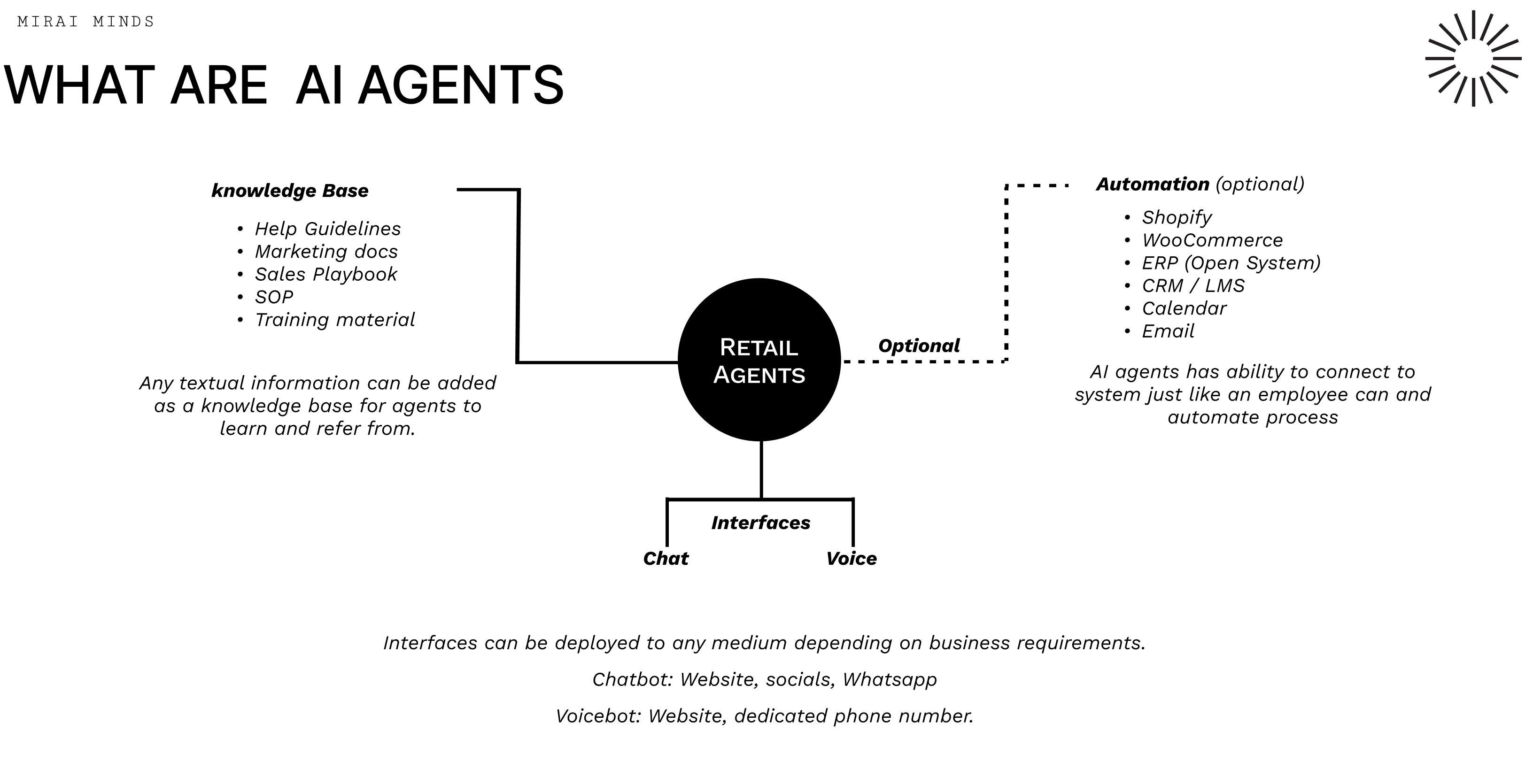
How Retail AI Agents Work
Retail AI agents combine a practical knowledge base, automated integrations, and flexible ways to talk to customers — all designed to make running your store easier and more efficient. Knowledge base (what the agent knows)- Customer service playbook: Clear steps and friendly scripts for handling common questions and issues
- Marketing content: Up‑to‑date product details, promotions, and brand messaging
- Sales playbook: Conversation tips and tactics that help turn interest into purchases
- Standard operating procedures: Consistent workflows for orders, returns, and fulfillment
- Training resources: Guides and examples that keep the agent improving over time
- Shopify: Sync orders, check stock, and access customer profiles directly from your store
- WooCommerce: Same seamless flow for WordPress shops
- ERP systems: Tie into back‑office systems for pricing, inventory, and fulfillment data
- CRM / LMS: Use customer histories and training records to personalize responses and improve accuracy
- Calendar: Book appointments and show availability in real time
- Email: Send confirmations, follow‑ups, and promotional messages automatically
- Chat: Website widgets, social DMs, and WhatsApp for quick text conversations
- Voice: Phone or VoIP interactions for hands‑free support and a more human touch
Why this matters for retail
- Provide friendly, 24/7 support so customers get answers anytime
- Scale support and sales without adding staff — handle many conversations at once
- Keep messaging consistent across channels for a reliable brand experience
- Automate routine tasks like order processing to reduce manual work and mistakes
- Offer personalized product suggestions based on customer data
- Monitor stock in real time and automate reorder alerts to prevent stockouts
Abandon Cart Recovery - A Detailed Use Case
One of the most impactful applications of Voice Agents in retail is automated abandon cart recovery. This sophisticated system can recover up to 20% of abandoned carts through intelligent, personalized outreach.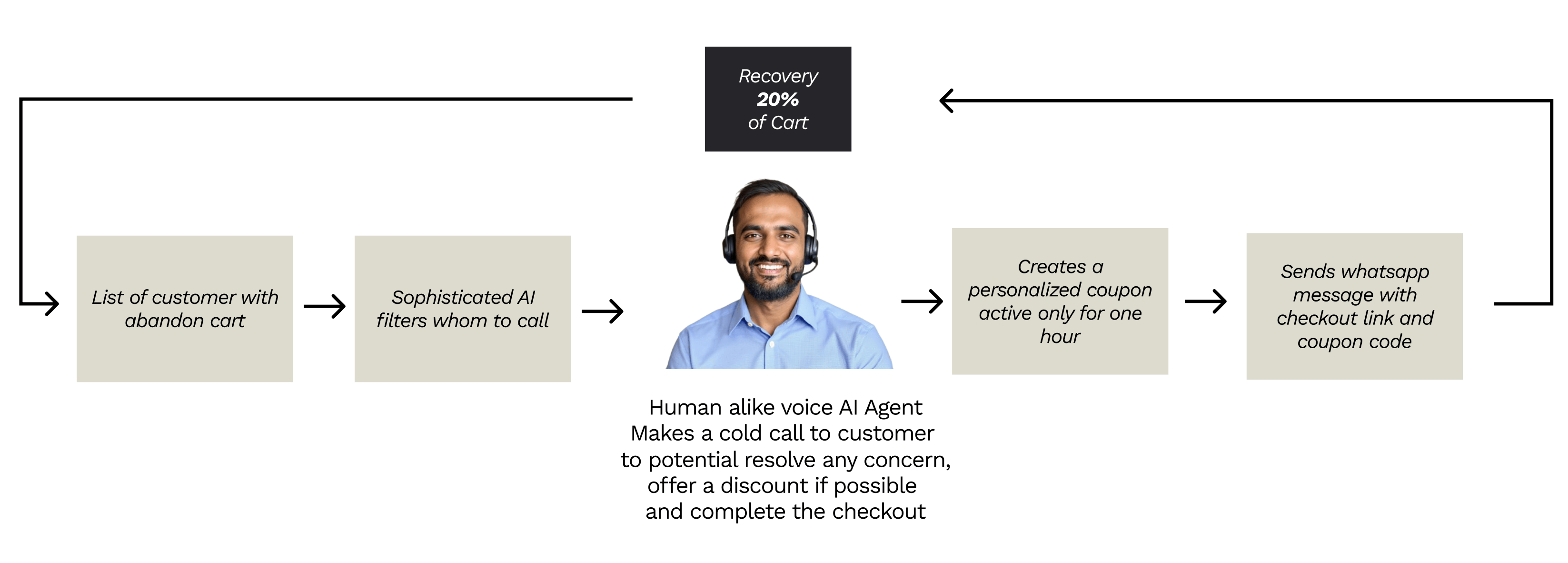
How It Works
The abandon cart recovery system operates through a seamless, multi-step process:- Smart Customer Identification - The system automatically identifies customers who have abandoned their shopping carts and uses sophisticated AI filters to determine the best candidates for outreach calls.
- Human-like Voice Engagement - A natural-sounding AI agent makes personalized phone calls to customers, addressing them by name and referencing their specific abandoned items.
-
Intelligent Conversation Flow - The agent engages in natural conversation to:
- Understand why the customer didn’t complete their purchase
- Address any concerns or objections they might have
- Offer personalized solutions or incentives when appropriate
- Dynamic Incentive Creation - Based on the conversation, the system can generate personalized discount coupons that are active for a limited time (typically one hour) to create urgency.
- Multi-channel Follow-up - After the call, the system automatically sends a WhatsApp message with a direct checkout link and the personalized coupon code, making it easy for customers to complete their purchase.
- 20% average cart recovery rate - Significantly higher than traditional email-based recovery
- Personalized approach - Each interaction is tailored to the specific customer and their abandoned items
- Immediate response - Customers receive help within hours of abandoning their cart
- Cost-effective - Automated system scales without increasing staff costs
- Data-driven insights - Learn why customers abandon carts and improve your checkout process
Getting Started with Retail AI Agents
Bringing Voice Agents into your retail business is easier than you might think. Below is a simple, practical path to get started and some tips to make them work well for your customers. Quick setup (4 easy steps)- Gather your content — Upload product catalogs, FAQs, return policies, and any service guides the agent should know.
- Connect your systems — Link Shopify, inventory, CRM, or any other tools so the agent can access orders, stock, and customer info.
- Choose channels — Pick where customers will talk to the agent (website chat, social DMs, WhatsApp, phone). Start with one or two and expand later.
- Train and test — Run common scenarios, fine‑tune replies, and have staff test handoffs to humans.
- Start by automating the highest-volume, repetitive requests (order status, returns, store hours).
- Make handoffs to human agents smooth and obvious for complex issues.
- Keep product details and pricing up to date so answers stay accurate.
- Track customer satisfaction and common failure points to prioritize improvements.
- Roll out new features gradually based on real customer feedback.